EzUtilities


EzUtilities is a versatile collection of utility scripts designed to streamline your Unity development workflow, making your game development experience faster and more efficient. With tools that cater to common game development needs, EzUtilities gives you the power to focus on creativity and iteration.
Features
- 🚀 Boost Development Speed: Achieve faster iteration times with ready-to-use scripts.
- 🔧 Versatile Tools: Includes utilities for gameplay mechanics, editor extensions, and more.
- 🧩 Modular Design: Install only what you need—each utility is available independently.
- 🎯 Editor Enhancements: Improve your workflow with helpful editor scripts.
Installation
Inside the Unity Editor using the Package Manager:
- Click the (+) button in the Package Manager and select "Add package from Git URL" (requires Unity 2019.4 or later).
- Paste the Git URL of this package into the input box: https://github.com/ebukaracer/EzUtilities.git#upm
- Click Add to install the package.
Setup
After successfully installing the package through the package manager, navigate to the menu option:
Racer > EzUtilities > Import Scripts(Force)
This will allow you to include and import the scripts in your project. If there are any updates to the package, repeat this operation to incorporate those updates. Additionally, include the asmdef file to save compilation time and improve the organization of the imported scripts; however, you can omit it for the editor scripts:
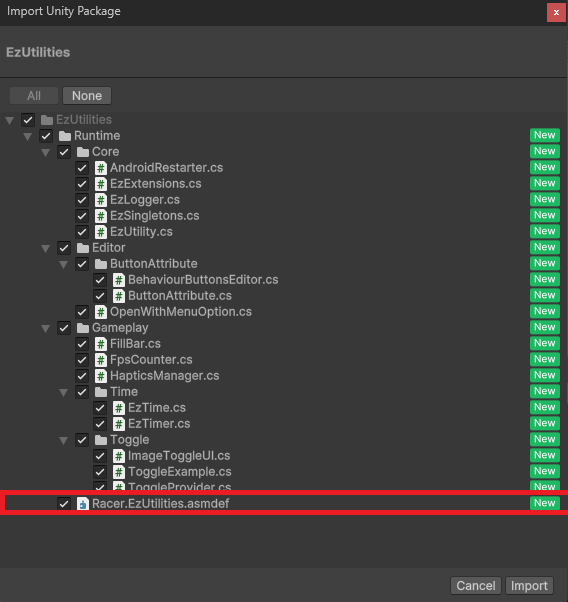
To remove this package completely(leaving no trace), navigate to: Racer > EzUtilities > Remove package
Contributing
Contributions are welcome! Please open an issue or submit a pull request.